02 / Applied AI workflows

Make recurring technical work more repeatable.

When information is scattered across documents, spatial data, and tools, a focused AI workflow can help. We start with one task, define a useful output, and build a pilot your team can evaluate.

Find your workflow bottleneck →

Six questions. About two minutes. No sign-up.

Discuss a workflow pilot →

Start with a useful output

Three practical starting points.

Explore an example, then agree the scope, integrations and review criteria for your team.

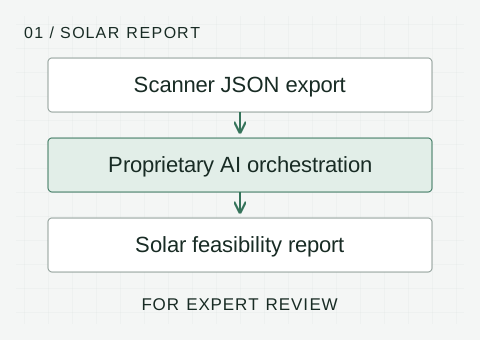
Scanner JSON can supply a separate proprietary AI reporting workflow, producing a solar feasibility report for expert review.
FIG. 01 / Solar feasibility reporting · schematic

Report Factory · separate reporting prototype

Solar feasibility reporting

You receive
An extensive solar report with figures, analysis and conclusions for expert review, prepared separately from the scanner’s screening PDF.

Inputs and human review

You provide
Solar project data, a scanner JSON export and supporting evidence.

Review point
An analyst checks the evidence, gaps and assumptions before delivery.

Explore solar reporting →
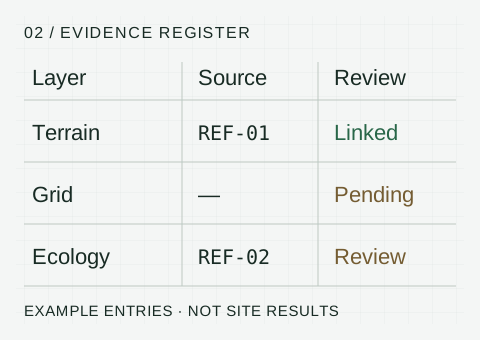
Example evidence matrix: terrain has a reference, grid evidence is pending and ecology needs review. These are illustrative statuses.
FIG. 02 / Evidence brief · schematic

Example pilot · scoped to your task

Evidence brief

You receive
A reviewable brief that organises findings, references and unresolved questions.

Inputs and human review

You provide
A recurring question and documents your team is authorised to use.

Review point
A subject specialist checks source support and missing context.

Scope an evidence workflow →
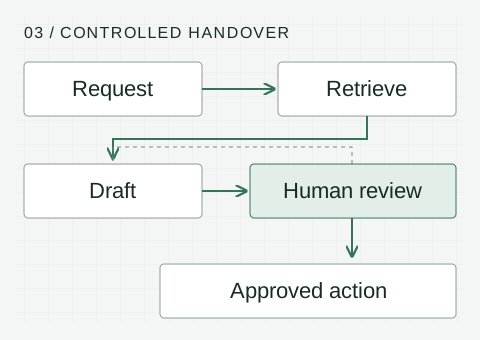
A request retrieves evidence and produces a draft. Human review sends revisions back or permits an approved action.
FIG. 03 / Enterprise handover · schematic

Example pilot · integration by scope

Enterprise handover

You receive
Validated fields, a prepared report or proposed system update, with exceptions routed for review.

Inputs and human review

You provide
A recurring process, representative records and the systems involved.

Review point
The process owner approves external actions and resolves exceptions.

Discuss a workflow pilot →

Schematics explain the process; example entries are not site findings. Pilot outputs and production requirements are agreed for each engagement.

Geotechnic Report Factory / Separate reporting workflow

Automated solar feasibility reporting.

Geotechnic Report Factory is our separate workflow for extensive solar feasibility reporting, with figures, analysis and conclusions. A JSON export from the Renewable Energy Site Scanner can supply site area and solar parameters, alongside the additional evidence and assumptions needed for the project.

Geotechnic-developed multi-agent orchestration supports report preparation and quality checks, bringing energy estimates, assumptions, source references and open risks into a document for expert review.

01 / Inside the scanner

Site screening PDF summary

Complete the web app’s solar, wind or geothermal workflow to generate a high-level site screening summary. It captures the initial assessment and questions for further investigation.

Open the Site Scanner ↗

02 / Separate workflow

Extensive solar feasibility report

Report Factory uses proprietary multi-agent orchestration to prepare a detailed solar report with figures, analysis, supporting evidence and conclusions for expert review.

Generating the scanner’s PDF summary does not run Report Factory or generate this full report.

Renewable energy toolJSON exportProprietary AI orchestrationSolar feasibility report · expert review

Report Factory is a separate reporting prototype. The JSON handover, additional inputs and delivery scope are confirmed for each project; an automatic connection from the scanner is not implied.

Your project inputs

Start with structured site evidence

The scanner export carries the site area and available solar parameters into the reporting workflow. Project assumptions and supporting evidence provide the context needed to interpret the results.

Available data, missing studies and the purpose of the assessment are agreed before report preparation.

Your report

A clearer basis for the next decision

  • Site context and solar resource assessment
  • Figures, energy estimates and key design assumptions
  • Economic considerations where inputs support them
  • Source references, uncertainties and evidence gaps
  • Conclusions, risks and priorities for further investigation
What makes the approach technically grounded?

Our proprietary reporting workflow combines domain knowledge, structured project data and coordinated AI capabilities. Quality checks and source references support a report that can be examined against its inputs. A qualified person reviews assumptions, evidence and conclusions before client use.

What does the JSON handover mean for my team?

The renewable energy tool exports site information in a structured format that the reporting workflow can use. This supports a repeatable handover and reduces manual re-entry. Compatibility, additional inputs and the integration scope are confirmed for your project.

What decisions can the report support?

The report supports early feasibility assessment and helps identify the questions to investigate next. Grid access, permitting, site conditions and environmental or social effects still require appropriate evidence and specialist assessment. Automated reporting does not itself establish bankability or replace engineering sign-off.

Designed to support better renewable-energy decisions, with human judgement and the effects on people and ecosystems kept in view.

How a pilot works

One useful task.
Clear evaluation criteria.

  1. 01

    Define the task

    Agree on the decision, useful output, and how to judge the result.

  2. 02

    Connect the evidence

    Identify relevant documents, data, spatial layers, and information gaps.

  3. 03

    Build and test

    Develop a focused workflow and check it against representative examples.

  4. 04

    Review and hand over

    Inspect the outputs together, document limitations, and agree on the next step.

You bring

  • A recurring task and someone who understands it
  • Representative data or documents you can share
  • Examples of a useful output and common errors
  • Your access, confidentiality, and operating constraints

We agree the handover

  • A scoped workflow and pilot implementation
  • Representative test cases and evaluation results
  • Human review points and known limitations
  • Usage notes and options for the next stage

Integrations, hosting, support, and production requirements are defined in the project scope.

Explore the technical design: models, harnesses and controls

From an AI model to an operational workflow

The model reasons.
The harness manages the work.

A capable model is one part of an agent system. Reliable delivery also needs a defined process, controlled access to tools, checks on the output and a clear route back to a person.

  1. 01 / MODEL

    Reason and generate

    The model interprets context, proposes actions and drafts outputs. Choose it for the task’s quality, speed and cost requirements.

  2. 02 / HARNESS

    Run the agent

    The surrounding software manages the execution loop, context and tool access. Codex is an example of a coding-agent harness, rather than simply a model.

  3. 03 / ORCHESTRATION

    Coordinate the process

    Connect triggers, agent tasks, structured handovers and business systems. A workflow can use one model or several.

  4. 04 / CONTROLS

    Check and govern

    Set permissions, validate outputs, record actions and require approval where an error could have consequences.

When one model is enough

A focused assistant can be a good starting point for a bounded task with a person checking the result. More agents or models add coordination, cost and failure modes; they should earn their place through evaluation.

ChatGPT is an application, a model is its underlying reasoning component, and Codex provides an agent environment for coding work. These are different layers—not interchangeable names for one “AI brain”.

When a platform helps

A platform becomes useful when work needs repeatable execution across tools, shared operating instructions and visibility across a team. It can centralise agent configuration and help separate workflow design from a particular model.

A model-flexible design can make it easier to compare models or replace one as requirements change. It does not remove platform dependence, and every replacement needs regression tests.

PLATFORM EXAMPLE · BRAINBASE

Choose the runtime and model for the work.

Brainbase documents multiple model choices and managed harnesses, including Codex and its Kafka runtime for team workflows and orchestration. Its shared API separates the choice of harness from the model, subject to compatibility and workspace availability.

For a scoped implementation, we would evaluate the platform’s fit with your tools, data requirements and operating process. We would also check permissions, approval points, activity records and recovery behaviour before production use.

Brainbase is an example to evaluate, not a claimed Geotechnic Solutions partnership or an existing client deployment. See Brainbase’s harness documentation ↗ and model compatibility ↗.

Applied to a renewable-energy report

Keep site data, calculations and evidence in structured records. Use a model to draft the explanation, check the JSON against agreed rules, and send the report for analyst approval. A different model can be tested against the same inputs and review criteria.

Resilience comes from the design

A second model can provide another review or a configured fallback, but models can make the same mistake. A fallback must be tested and must not silently send data to an unapproved provider. Access limits, deterministic checks and accountable human review remain essential.

Enterprise workflow implementation

Connect the work
between your existing systems.

The same approach applies beyond geoscience: start with a recurring business task, connect the relevant information, and make the handover to a person or system explicit.

Enquiry to a prepared response

Turn a shared-inbox or form submission into a structured brief, retrieve relevant internal material, and prepare a response for approval. Update the agreed CRM fields after review.

Example pilot: reduce repeated data entry while keeping a person responsible for customer communication.

Documents to an operational report

Extract agreed fields from recurring documents, validate them against business rules, and assemble a report or system update. Route incomplete or conflicting records to a reviewer.

Example pilot: weekly project reporting with source references and an exception list.

Where Geotechnic Solutions fits

We help define the workflow, map inputs and outputs, build a focused pilot, and evaluate whether the result is useful. Implementation can be scoped around your existing automation tools or an agreed specialist AI platform, working with your IT team and the provider where needed.

What an implementation needs

  • Named process owners and agreed approval points
  • Supported APIs, authorised data access and field mappings
  • Representative test cases, error handling and activity records
  • Clear responsibilities for hosting, ongoing support and changes
PLANNED COLLABORATION · HELM

From an enterprise opportunity to a scoped pilot.

Angello plans to work with Youssef’s team at Helm ↗, using a pipeline tracker to organise opportunities and shape practical AI workflow projects.

The intended approach is to capture the business problem, identify the process owner and relevant systems, and agree a focused pilot with clear next steps. Geotechnic Solutions brings domain understanding, workflow discovery and evaluation; delivery responsibilities would be agreed with the team for each engagement.

This describes planned work, not a completed client deployment or a formal delivery partnership.

Discuss an enterprise workflow →

A pattern to evaluate

Clear roles.
Traceable handovers.

For a task that benefits from multiple agents, define what each agent can access, what it should produce and how the next step checks its work.

  1. 01 / COORDINATE

    Define the work

    A coordinator divides the brief into bounded tasks with explicit inputs and completion criteria.

  2. 02 / GATHER

    Connect the evidence

    A specialist gathers authorised material and keeps source references attached to the findings.

  3. 03 / VALIDATE

    Check the handover

    Required fields and agreed rules are checked. Missing or conflicting evidence goes to a reviewer.

  4. 04 / REVIEW

    Approve the output

    A person reviews the draft and decides whether it is ready for the agreed next action.

Illustrative design pattern. A single-agent or conventional automation workflow may be sufficient; complexity must be justified through evaluation.

About Angello’s experience and ongoing AI learning →

Domain judgement stays involved

Useful AI needs
a way to check its work.

Experience in QGIS-based AI task creation and evaluation informs our approach: check spatial reasoning, instruction adherence, unsupported assumptions, and the usefulness of the final output.

AI for people and planet

We aim to build workflows that support human wellbeing and decisions within planetary boundaries. For each pilot, we ask who benefits, what risks need attention and whether the value justifies the resources used. Clear evidence, human oversight and proportionate use of AI guide the design.

Our purpose and SDG priorities →

Start with one useful question

A site to assess.
A workflow to improve.

Tell us what you are trying to decide, what information you have, and where the work gets stuck.

Let’s talk about your project